Track Your Fasting, Your Way
Intermittent fasting is simple in concept—don’t eat for a set number of hours—but keeping track of when you started, how long you’ve been going, and when you can break it gets messy without a timer. That’s what this is for.
Start a fast, let the timer run, and see your progress throughout. No complicated rules, no strict protocols. Just a timer that helps you stick to whatever fasting schedule you’re trying out. Whether you’re doing 16 hours, 18 hours, or experimenting with longer fasts, the app keeps track so you don’t have to do mental math every time you wonder “how much longer?”
Starting a Fast
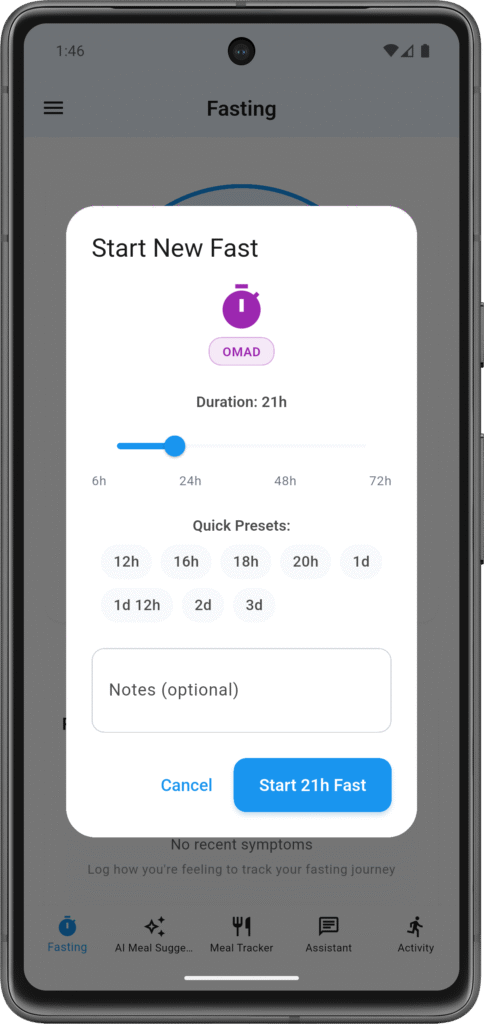
When you’re ready to start fasting, open the timer and pick your target duration. The app offers common options like 12, 14, 16, 18, 20, or 24 hours. These cover most intermittent fasting schedules people actually use.
If you want a custom duration—say 15 hours or 20.5 hours—you can set that too. Target can be anything from 1 hour up to 168 hours (one week), though most people stick to the 12-24 hour range.
Hit start and the timer begins counting from now. You don’t need to calculate when you’ll finish—the app shows you both the elapsed time and your target, so you always know where you stand.
During Your Fast
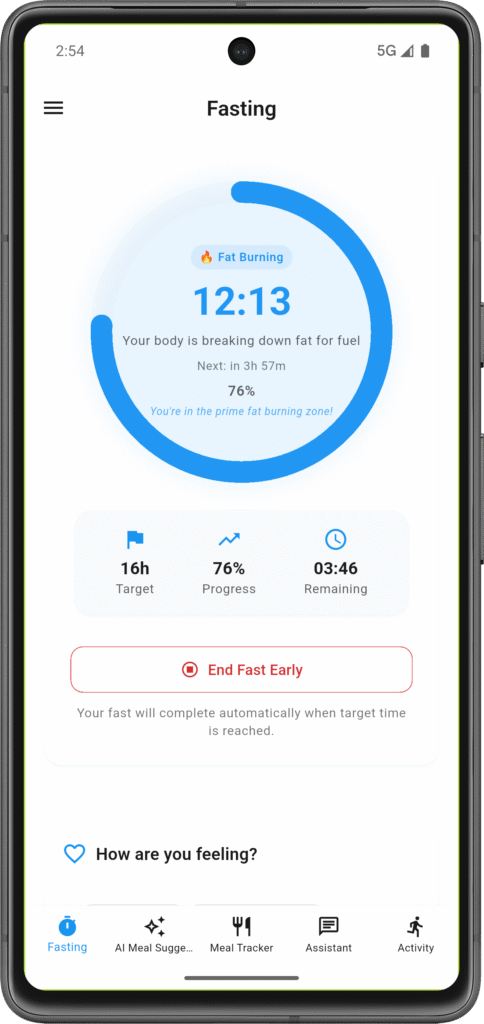
Once your fast is active, the timer shows your current progress. You’ll see how many hours and minutes you’ve been fasting, what percentage of your goal you’ve completed, and how much time remains until you hit your target.
The progress ring or bar fills up as you go, which gives you a visual sense of how close you are. Some people find the visual progress motivating. Others just check the numbers. Use whichever view makes sense to you.
You can check in on the timer anytime during your fast. The app stays updated even if you close it—when you come back, your time continues accurately from when you started.
Logging Symptoms
Fasting affects everyone differently. Some people cruise through 18 hours no problem. Others feel symptoms at hour 10. There’s no “right” experience, but it helps to track what YOU experience so you can spot patterns.
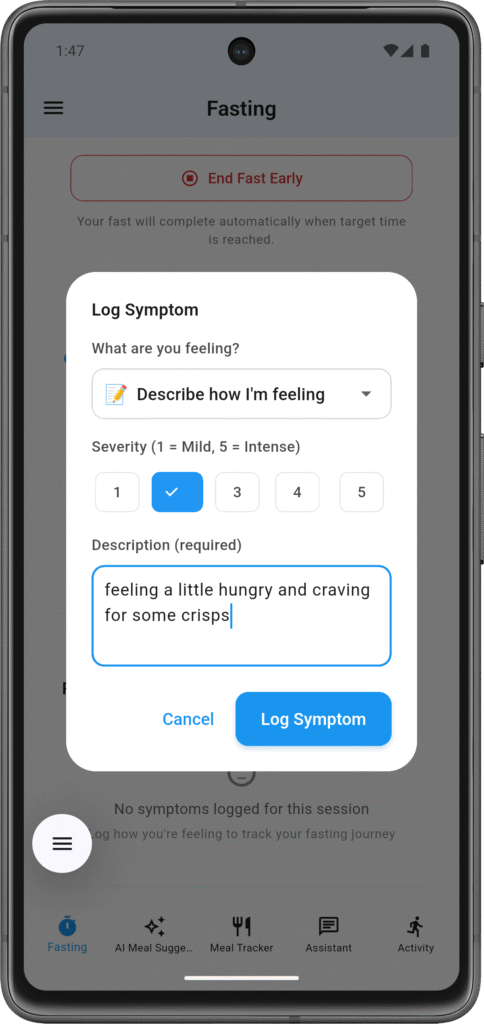
When you feel something worth noting during a fast—hunger, headache, dizziness, increased focus, whatever—you can log it. Pick the symptom type from the list, rate its severity from 1 (mild) to 5 (intense), and optionally add notes about context.
These logs tie to your specific fast, so when you look back at your history, you can see which fasts went smoothly and which ones were rough. Over time, you might notice patterns like “I always get headaches around hour 12 on workout days” or “18-hour fasts feel easier than 16-hour fasts for some reason.”
The symptom data also feeds into the AI assistant. If you ask “why do I feel dizzy?” mid-fast, the AI can see you’re at hour 14, you logged dizziness as severity 3, and give you context-aware suggestions.
Breaking Your Fast
When you’re ready to stop fasting, you tap to end the session. The app asks why you’re ending it—this helps with your own tracking and pattern recognition.
Completed: You don’t need to do anything, the app auto completes it and send notification.
End Fast Early: You’re ending before reaching your target. Maybe you felt off, had a social situation come up, or just decided it wasn’t working today. No judgment from the app—it just logs that you broke early.
The app saves this information in your history so you can see your completion rate over time. If you’re completing 80% of your fasts, that’s useful data. If you’re only completing 30%, maybe your targets are too ambitious or your timing doesn’t fit your schedule.
Viewing Your History
Your past fasts live in the history section. You can see all your previous sessions with start time, end time, target duration, whether you completed it, and any symptoms you logged during it.
This history is where patterns become visible. Maybe you complete most weekday fasts but struggle on weekends. Maybe 16-hour fasts have a 90% completion rate while 20-hour fasts are only 50%. Maybe you feel better during fasts when you’ve been more active that day. Your data shows what’s actually happening versus what you think is happening.
You can also see your streaks if that motivates you—consecutive days hitting your target, longest successful fast, total fasting time accumulated. Some people love streak tracking, others ignore it. It’s there if you want it.
One Active Fast at a Time
The app only lets you have one active fast at a time. This isn’t a limitation—it’s intentional. You can’t be simultaneously doing a 16-hour fast and an 18-hour fast. You’re either fasting or you’re not.
If you try to start a new fast while one is already running, the app will ask if you want to end the current one first. This prevents accidentally having multiple timers running and keeps your data clean.
Custom Durations and Flexibility
While the app suggests common durations (12, 14, 16, 18, 20, 24 hours), you’re not locked into those. Set any target between 1 and 168 hours.
Want to try “fasting until I wake up naturally” without a specific hour target? Pick a rough estimate and break early when you’re ready. The app tracks what actually happened, not just what you planned.
Some people use the timer more casually—starting it after dinner and breaking it whenever they’re hungry the next day. Others treat the target as a hard commitment. The tool works for both approaches.
Why Track This Data
Fasting is personal. What works for someone else might not work for you. By tracking your fasts, symptoms, and completion rates, you build a picture of what YOUR body does during fasting.
That data becomes useful when making decisions. “Should I push to 18 hours today?” Well, looking at your history, you’ve only completed 3 of 8 attempted 18-hour fasts, and you logged severe hunger every time around hour 15. Maybe 16 hours is your sweet spot right now. Or maybe you need to adjust what you eat before fasts to make 18 hours more sustainable.
The AI assistant uses this data too. When you ask questions like “why do my fasts feel harder lately?” it can look at your recent history and spot changes in duration, completion rate, or symptom patterns.
Connecting to Everything Else
The fasting timer isn’t isolated. It connects to your other app data:
- Meals: When you break a fast, your meal logging shows what you ate and when
- Activity: See how your step count correlates with fasting success
- Calories: Understand your deficit during fasts vs. eating windows
- AI Assistant: Get personalized advice based on your current fast status
- Symptoms: Track patterns in how you feel during different fasting durations
Your complete picture emerges from how these pieces connect, not from any single feature in isolation.
What It Doesn’t Do
The timer doesn’t send you reminders to start fasting (though reminder functionality exists elsewhere in the app). It doesn’t prescribe specific fasting schedules—you choose your own targets. It doesn’t judge you for breaking fasts early or skipping days. It doesn’t gamify fasting with points or achievements (though streaks are tracked if you care about them).
It’s a tool for tracking, not a coach pushing a specific fasting protocol.
Using It Effectively
Start with realistic targets. If you currently eat breakfast at 8am, jumping straight to 18-hour fasts might be rough. Try 12 hours, see how that goes, gradually increase.
Log symptoms honestly, especially when trying new durations. “I felt great!” and “I felt terrible!” are both useful data points.
Review your history occasionally. Look for patterns in completion rates, symptom types, and which durations work best for your schedule and body.
Don’t treat the target as sacred. If you set 16 hours but feel off at hour 14, breaking early is fine. The timer tracks what you planned AND what you actually did—both pieces matter.