Describe Your Meal, Get the Nutrition
Tracking nutrition usually means searching food databases, measuring portions, and adding everything up manually. That’s tedious. The AI meal analysis feature takes a different approach: just describe what you ate in plain text, and the AI estimates the nutrition for you.
Type “grilled chicken breast with rice and steamed broccoli” and within seconds you get back calories, protein, carbs, fat, and a breakdown of each component. Not laboratory-perfect, but close enough to give you useful tracking data without the hassle of manual lookup.
How It Works
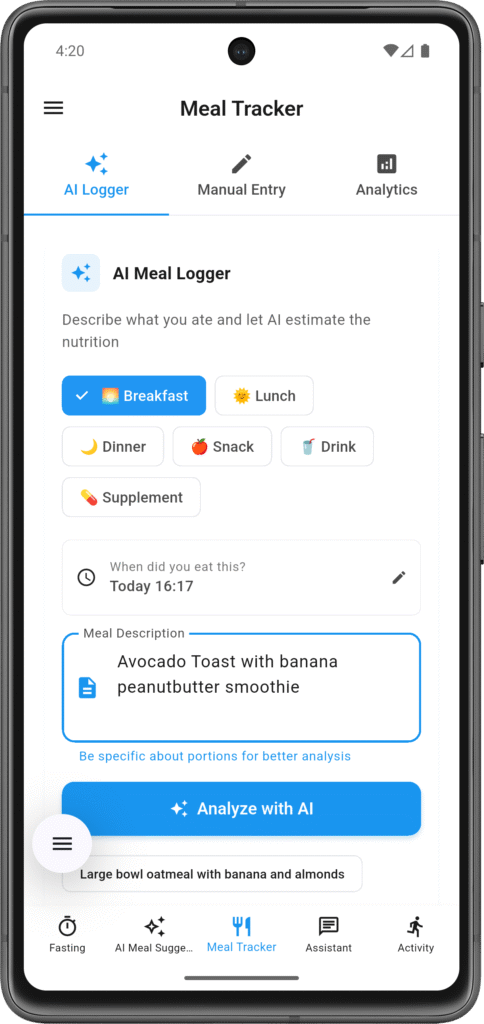
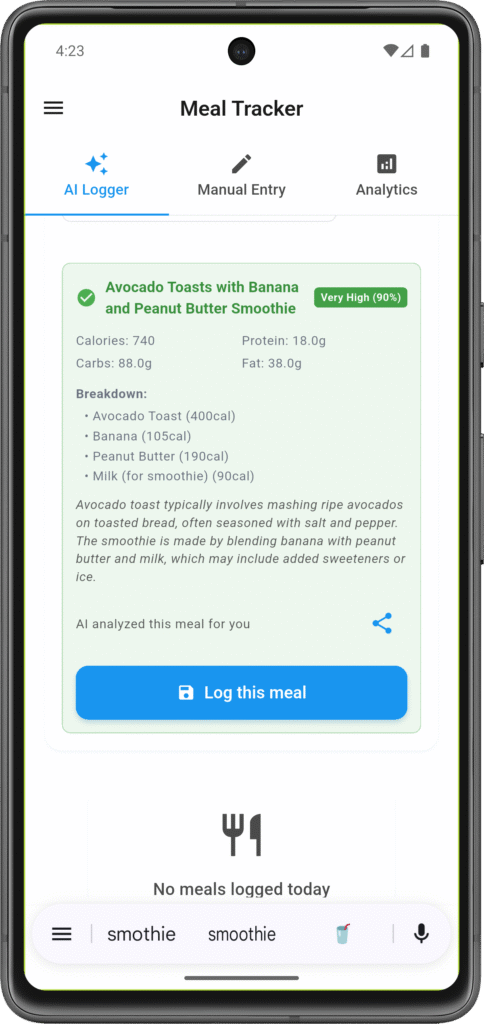
Open the AI Logger tab, type a description of what you ate, and submit it. The AI processes your text description and returns a nutrition breakdown including total calories, protein, carbs, fat, and individual estimates for each food item you mentioned.
The AI interprets natural language, so you don’t need precise formatting. “Chicken salad with dressing” works. “6oz grilled chicken, mixed greens, cherry tomatoes, balsamic vinaigrette” works too. More detail usually means better estimates, but casual descriptions get you in the ballpark.
After you get the analysis, review the results, adjust anything that seems off, and save it to your meal log. If the AI misunderstood what you wrote or the estimates look wrong, you can edit the nutrition values before saving.
The Three Tabs
Tab 1: AI Logger
This is where you describe meals and get AI analysis. Type what you ate, submit, get nutrition breakdown. Each analysis uses one of your daily AI credits.
Tab 2: Analytics
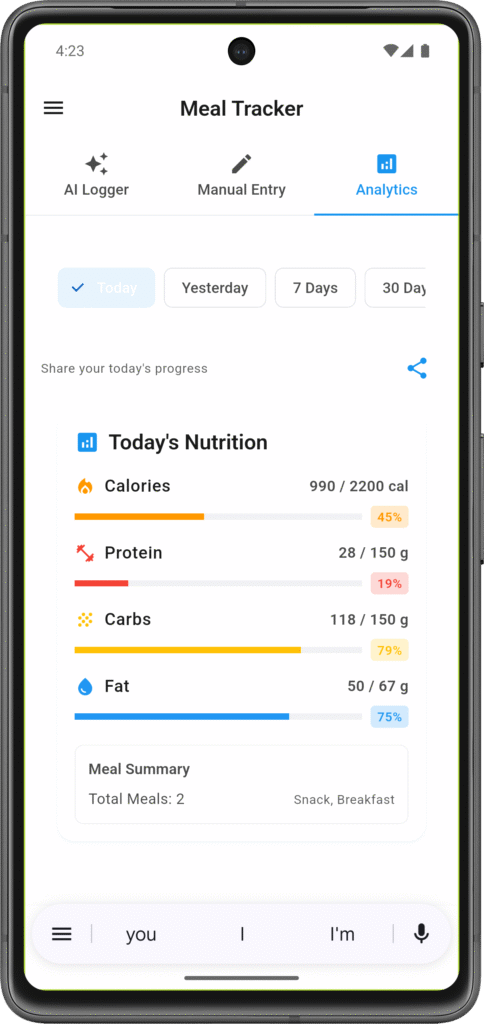
See your nutrition patterns over time. Daily calorie trends, weekly averages, protein intake, macro distribution. Your logged meals turn into insights about eating habits.
Tab 3: Meal List
Your complete meal history. Every meal you’ve logged—AI-analyzed or manually entered—lives here. Filter by date, meal type, or search for specific foods. Edit or delete entries as needed. You can also manually add meals here without using AI.
What the AI Understands
When you describe a meal, the AI looks for:
- Food items: Individual components (chicken, rice, vegetables)
- Cooking methods: Grilled, fried, steamed, raw (affects calories)
- Portion sizes: “6 oz”, “1 cup”, “large”, “medium” (if you include them)
- Common meals: “burger and fries”, “pasta with marinara”, “protein shake”
If you don’t specify portions, the AI assumes typical serving sizes. “Chicken breast” becomes ~4-6oz. “Bowl of rice” becomes ~1 cup. You can always adjust after if these assumptions are wrong for your actual portions.
Examples of good descriptions:
- “6oz salmon, 1 cup quinoa, roasted asparagus”
- “Two scrambled eggs with toast and butter”
- “Large greek salad with grilled chicken and feta”
- “Protein shake: banana, whey protein, almond milk, peanut butter”
Examples that work but are less precise:
- “Pasta for dinner”
- “Chicken and rice”
- “Salad”
The AI will analyze anything you write, but more detail = better estimates.
Confidence Scores
Every AI analysis comes with a confidence score showing how certain the AI is about its estimate:
95%+ (High Confidence)
The AI clearly understood what you described and has solid nutrition data for those foods. Common foods with standard portions get high confidence.
80-94% (Medium Confidence)
The AI made reasonable guesses but isn’t entirely certain. Maybe you didn’t specify portion sizes, or mentioned less common foods. Still useful, worth a quick review.
Below 80% (Low Confidence)
The AI struggled to interpret your description or estimate nutrition accurately. Could be very vague descriptions (“lunch”), uncommon foods, or complex mixed dishes. Definitely review and manually adjust these.
The confidence score helps you know which analyses to trust as-is and which need your input.
Manual Meal Logging
Don’t want to use AI? You can log meals manually from Tab 3 without any AI analysis.
Create a new meal entry, pick the meal type, add name and description, enter the nutrition values you know, and save. No AI analysis, no usage limits consumed. Good for:
- Simple meals you already know the nutrition for
- Packaged foods with labels (just copy the label data)
- Times when you’ve hit your daily AI limit
- Quick logging when you don’t need detailed breakdown
Some people use AI for complex meals and manual entry for simple ones.
Usage Limits
AI analysis has daily limits:
Free tier: 10 meal analyses per day
Premium tier: 100 meal analyses per day
Three meals per day = 3 analyses used. Most people don’t hit 10 unless they’re analyzing every snack too. Manual logging has no limits—log as many meals manually as you want.
When you hit your daily limit, you can still view existing meals, use analytics, and manually log new entries. You just can’t request more AI analyses until tomorrow.
Profile Setup for Better Analysis
The AI can analyze meal descriptions without knowing anything about you, but results improve with profile context:
Dietary restrictions: If you’re vegetarian, the AI won’t default to assuming meat in ambiguous descriptions.
Cuisine preferences: Regular Mediterranean meals? The AI gets better at recognizing typical Mediterranean ingredients and portions.
Calorie targets: Helps the app flag when a meal estimate seems unusually high or low for your typical patterns.
None required, but more context = better estimates over time.
Connecting to Your Other Data
Meal logging integrates throughout the app:
Fasting: Meals logged during eating windows link to your fasting sessions. See what you ate after each fast.
Calorie tracking: Logged meals automatically update your daily “calories consumed” number.
AI Assistant: When you ask “did I eat enough protein today?” it checks your logged meals to answer.
Activity: Compare more active days vs. less active days against your nutrition intake.
Your nutrition picture comes from how meal data connects with fasting, activity, and calorie tracking.
When to Use AI Analysis
AI meal analysis makes sense for:
- Multi-component meals (stir-fries, salads with multiple ingredients, mixed dishes)
- Restaurant meals where you’re not sure of exact ingredients or portions
- Home cooking when you don’t want to measure and calculate everything
- Learning what’s actually in meals you eat regularly
Less useful for:
- Packaged foods with nutrition labels (just read the label)
- Very simple single-ingredient meals (100g chicken breast = easy to look up)
- Times when rough estimates aren’t good enough (specific medical nutrition requirements)
Use it when it saves time or gives information you wouldn’t otherwise track. Skip it when manual entry is faster.
What It Doesn’t Do
The AI doesn’t judge your food choices. No “this is unhealthy” warnings or “eat more vegetables” nagging. It analyzes nutrition data based on what you describe, that’s it.
It doesn’t track micronutrients beyond the basics (just calories, protein, carbs, fat). If you need vitamin or mineral tracking, you’ll need specialized nutrition software.
It’s not precise enough for medical nutrition requirements. If you have specific dietary needs for health conditions, work with a nutritionist, don’t rely solely on AI estimates.
And it can’t read your mind—if your description is vague (“I had lunch”), the estimates will be vague too.
Using It Realistically
Don’t expect perfection. AI text analysis gives “good enough” nutrition estimates, not laboratory precision. If it estimates 650 calories and your meal was actually 700, that 50-calorie difference averages out over time.
Be reasonably specific in descriptions. “Chicken and vegetables” leaves a lot to interpretation. “Grilled chicken thigh with roasted broccoli and carrots” gives the AI much better information to work with.
Review results before saving. Takes 10 seconds to scan the breakdown and catch obvious misinterpretations.
Use confidence scores as a guide. High confidence? Probably fine. Low confidence? Definitely review.
Focus on patterns and trends, not daily perfection. The value is seeing your nutrition habits over weeks and months, not stressing about whether Tuesday’s lunch was exactly 632 calories or 680.