Your Movement, Tracked Automatically
Your phone is already tracking your steps. IMCAF just surfaces that data and helps you make sense of it. No extra devices, no manual logging (unless you want to), just open the app and see how much you’ve moved today.
Think of it as having visibility into what your body’s been up to. Walking to the kitchen, pacing during phone calls, actual exercise—it all counts. And once you can see your movement patterns, you can start connecting them to how you feel, what you eat, and how your fasting goes.
How It Works
Your phone has built-in sensors that detect movement. IMCAF taps into those sensors to count your steps throughout the day. Each step burns roughly 0.04 calories, so 10,000 steps equals about 400 calories burned from movement.
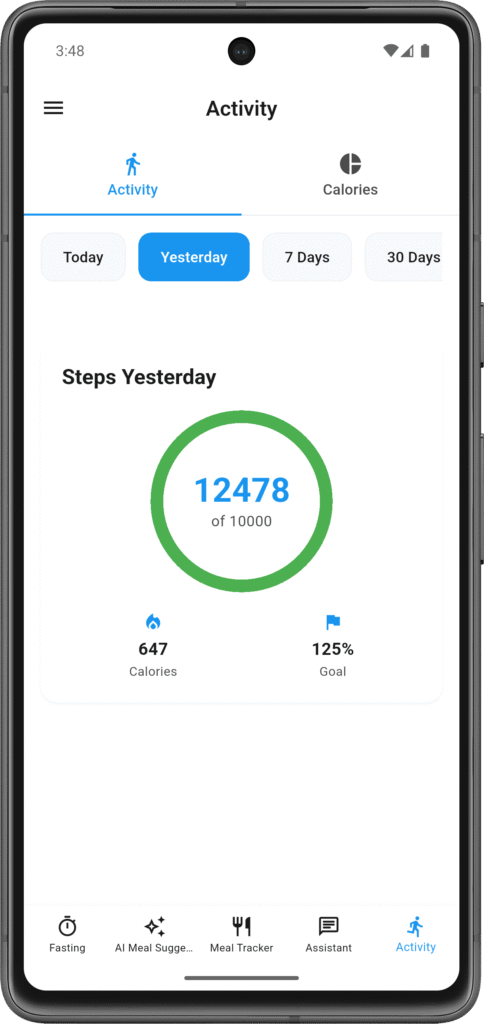
The app updates your count automatically as you move around. You don’t need to hit refresh or tell it you went for a walk—it just knows. Open the app anytime and you’ll see your current step count, calories burned from those steps, and your progress toward whatever daily goal you’ve set.
If you forget your phone during a walk or leave it at your desk all day, those steps obviously won’t count. This is a phone-based tracker, not a wearable. But for most people carrying their phone most of the time, it captures enough to show meaningful patterns.
Setting Your Step Goal
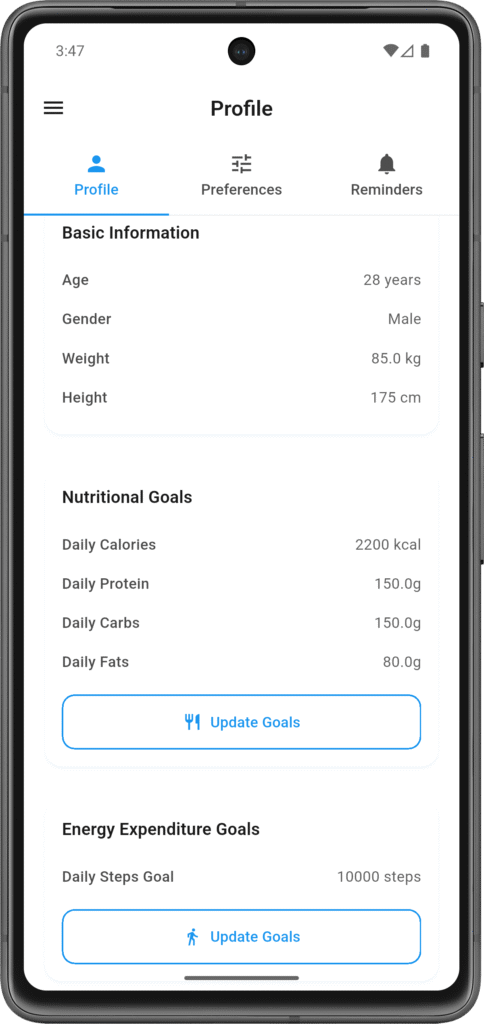
The app suggests 10,000 steps per day as a starting point, which is a common baseline. But you might want more or less depending on where you’re at right now. If you’re currently averaging 4,000 steps, jumping to 10,000 overnight isn’t realistic. If you’re already hitting 12,000 regularly, that goal won’t push you.
Set your goal in Profile → Goals → Activity. Choose a number that’s slightly above your current average—enough to motivate you, not so high that you’ll never hit it. You can always adjust it later as your activity level changes.
What Gets Tracked (and What Doesn’t)
IMCAF counts steps from walking, running, climbing stairs, basically any movement where your legs are taking you somewhere. If you’re pacing around your house while thinking, those steps count. Shopping trip where you walk the entire store? Counts.
What doesn’t count: cycling (the wheels move, not your legs), swimming (phone’s not with you), lifting weights (minimal stepping), driving (obviously), or any stationary activity. This is normal for step trackers—they’re designed specifically for walking and running movements.
If you do a lot of non-step activities, that’s fine. The tracker isn’t trying to capture your entire fitness life, just the walking part of it. You’ll still get useful data about your movement patterns.
Viewing Your Data
The main activity screen shows today’s numbers by default. You can switch to yesterday’s totals, the past 7 days, or the past 30 days to see trends. The history view shows your daily step counts, which days you hit your goal, your best day on record, and your average over the selected period.
This is where patterns start becoming visible. Maybe you walk way more on weekdays than weekends. Maybe you hit 8,000+ steps every day during the workweek but drop to 3,000 on Saturdays. Maybe you noticed you complete longer fasts on days when you’re more active. Whatever patterns exist in YOUR data, you’ll start seeing them.
Connecting Activity to Everything Else
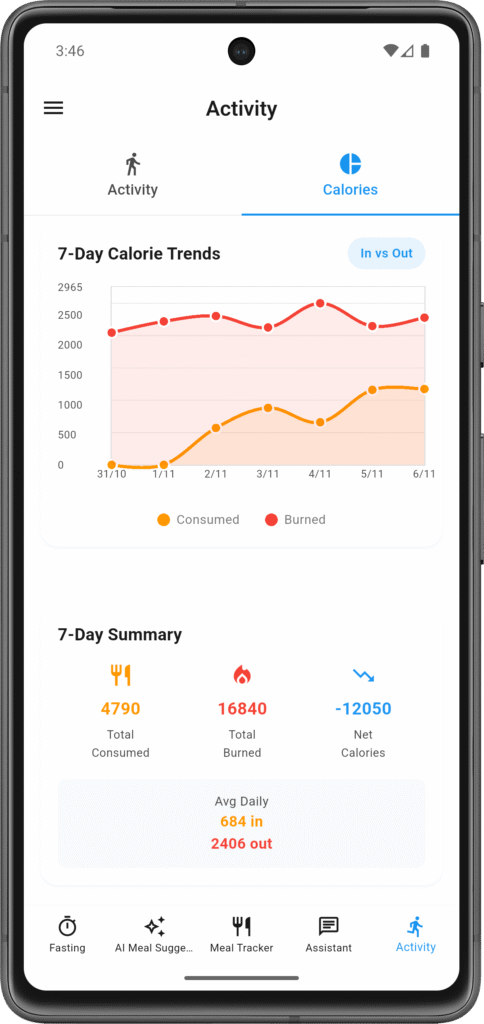
Step tracking becomes more useful when you connect it to your other data. More active days might mean you can eat a bit more without derailing your calorie goals. Less active days might mean you need to adjust your eating window or meal sizes.
If you’re fasting, seeing your calorie burn can help you understand your deficit. You’re not eating (0 calories in) and you’ve burned 350 calories from 8,000 steps plus your BMR—that’s a real energy deficit you can actually quantify.
The AI assistant factors in your activity when you ask questions. “Should I eat more today?” Well, you walked 12,000 steps and burned 500 active calories, so maybe. Context matters, and activity is part of that context.
Getting Accurate Counts
For the most accurate tracking, carry your phone with you. Pocket, bag, hand—doesn’t matter much as long as it’s moving with your body. The sensors need to detect your movement to count it.
Make sure you’ve granted the app permission to access your phone’s motion sensors. On iOS, that’s under Settings → IMCAF → Motion & Fitness. On Android, it’s Settings → Apps → IMCAF → Permissions → Physical Activity. You only need to do this once.
Battery saver modes on some phones can limit sensor access, which might affect accuracy. If your step counts seem way off, check if battery saver is blocking the app’s sensor access.
What It Doesn’t Do
The tracker doesn’t integrate with fitness watches or bands yet. That’s planned for future updates, but for now it’s phone-only. It also doesn’t break down your steps by hour (just daily totals), doesn’t track non-step exercises like cycling or swimming, and doesn’t calculate distance traveled (though that’s in the database schema, so might come later).
For most people, automatic step counting is enough to spot patterns and stay aware of movement levels. If you need more detailed fitness tracking, you might use this alongside another dedicated fitness app.
Using It Effectively
Don’t obsess over hitting your exact goal every single day. Some days you’ll crush it, some days you won’t. Look at weekly averages instead of daily perfection. If you’re averaging 7,500 steps per week and your goal is 8,000, you’re close—no need to stress about individual low days.
Use step goals as gentle motivation, not rigid requirements. If you’re hungry during a fast and bored, a 10-minute walk adds 1,000+ steps and often makes the hunger pass. If you’re deciding between two meal options, checking that you’ve been more active today might help you choose the larger portion without guilt.
The real value is seeing patterns over time. Do you move more on fasting days? Less? Does hitting your step goal correlate with better sleep, easier fasts, or more consistent eating? Your data will show you what works for YOUR body.